Specifications TP-Link Omada OC200
| Features | Description |
|---|---|
| Product Type | Omada Hardware Controller |
| Processor | Dual-Core ARM Cortex-A53, 1.2 GHz |
| Memory | 1 GB DDR3 |
| Storage | 4 GB eMMC + 1 MB NOR Flash |
| Network Ports | 2 × 10/100 Mbps Ethernet Ports |
| USB | 1 × USB 2.0 Port |
| Power Supply | 802.3af/at PoE or Micro USB 5V / Minimum 1A |
| Management | Omada App, Web UI and Cloud Access |
| Management Scale | Recommended for managing up to 25 Omada devices |
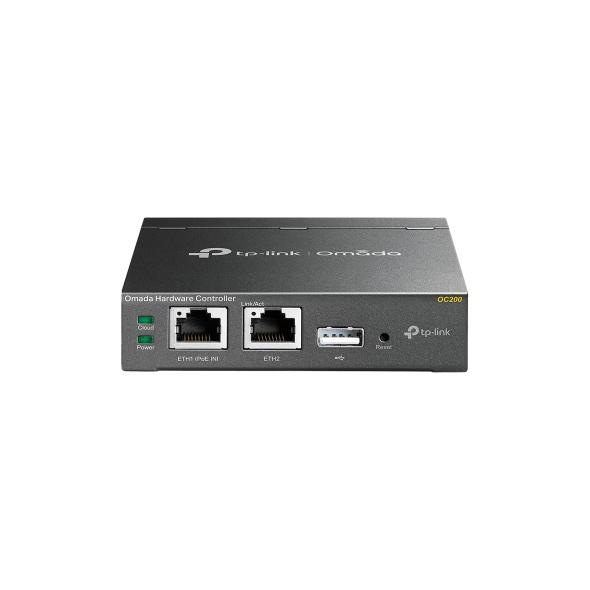
| Design | Fanless Desktop/Wall-Mount Hardware Controller |
| HARDWARE | |
|---|---|
| Processor | Dual-Core ARM Cortex-A53 @ 1.2 GHz |
| Memory | 1 GB DDR3 |
| Storage | 4 GB eMMC + 1 MB NOR Flash |
| Ethernet Ports | 2 × 10/100 Mbps Ethernet Ports |
| USB Port | 1 × USB 2.0 |
| Micro USB | 1 × Micro USB Port for Power Supply |
| Reset | 1 × Reset Button |
| Kensington Lock | Supported |
| Cooling | Fanless Design |
| POWER | |
|---|---|
| PoE Input | 802.3af/at PoE |
| USB Power Input | Micro USB, DC 5V / Minimum 1A |
| Maximum Power Consumption | Up to 7.5W when powered by PoE with USB 2.0 connected |
| Low Power Consumption | Approximately 3.5W when powered through Micro USB without USB 2.0 connected |
| OMADA MANAGEMENT | |
|---|---|
| Centralized Management | Centralized management of Omada Access Points, Switches and Gateways |
| Automatic Device Discovery | Supported |
| Batch Configuration | Supported |
| Batch Firmware Upgrade | Supported |
| Online Upgrade | Supported |
| Reboot Schedule | Supported |
| PoE Schedule | Supported |
| WLAN Scheduler | Supported |
| DDNS | Supported |
| SNMP | Supported |
| SSH | Supported |
| L3 Management | Supported |
| Multi-Site Management | Supported |
| Cloud Access | Free Cloud Access for Remote Management |
| NETWORK MANAGEMENT | |
|---|---|
| Network Monitoring | Real-Time Network Monitoring and Traffic Analysis |
| Network Topology | Real-Time Network Topology Visualization |
| Dashboard | Custom Network Dashboard |
| Network Map | Supported |
| Client Monitoring | Client List and Client Statistics |
| Device Monitoring | Device List and Device Statistics |
| Logs | Alerts, Events and Custom Notifications |
| Insights | Known Clients, Past Connections, Portal Authorizations and Rogue APs |
| Wi-Fi Heatmap | Supported |
| Network Reports | Visualizable Network Reports |
| NETWORK FEATURES | |
|---|---|
| Wired Network Management | Supported |
| Wireless Network Management | Supported |
| ACL | Supported |
| URL Filtering | Supported |
| Attack Defense | Supported |
| Routing/NAT | Supported through compatible Omada Gateways |
| Bandwidth Control | Supported |
| VPN | IPsec, L2TP, PPTP, OpenVPN and WireGuard VPN management |
| Portal | Voucher, Local User, SMS, RADIUS and External Portal Server |
| 802.1X | Supported |
| RADIUS | Authentication, MAC Authentication and Accounting |
| GENERAL | |
|---|---|
| Product Type | Omada Hardware Controller |
| Network Ports | 2 × 10/100 Mbps Ethernet |
| USB | 1 × USB 2.0 |
| Power | 802.3af/at PoE or Micro USB 5V / Minimum 1A |
| Dimensions | 100 × 98 × 25 mm |
| Installation | Desktop or Wall Mount |
| Cooling | Fanless |
| Operating Temperature | -5°C to 50°C |
| Storage Temperature | -40°C to 70°C |
| Operating Humidity | 10% to 90% RH, Non-Condensing |
| Storage Humidity | 5% to 90% RH, Non-Condensing |
| Certifications | CE, FCC and RoHS |
Note: The TP-Link Omada OC200 is a dedicated hardware controller designed to centrally manage compatible Omada Access Points, switches and gateways. It provides automatic device discovery, batch configuration, firmware upgrades, network monitoring, topology visualization, multi-site management and free remote cloud access through the Omada App or Web UI. The current OC200 V3 is recommended for managing approximately 25 Omada devices.
Important: The OC200 is a network controller, not a router, switch or Access Point. Its Ethernet ports are used to connect the controller to the network and communicate with Omada devices. It can receive power through 802.3af/at PoE or through Micro USB 5V.
จัดจำหน่าย By บริษัทโฟกัส ซิสเต็ม แอนด์ ดีไซน์ ช่างติดเเละซ้อมกล้องวงจรปิด พัทยา ชลบุรี